Over a long period of time, when companies talked about data leakage, their attention tended to focus on “technical threats” such as cyberattacks, malware, and external intrusions. But as the number of endpoints continues to grow and the way people work keeps evolving, more and more data leakage does not come from an “attack.” Instead, it happens in everyday, legitimate business activities that are permitted by default—data is not “stolen,” but gradually slips beyond an organization’s original management boundaries during normal use, copying, and sharing.
For small and medium-sized businesses, this trend is especially evident. On one hand, cloud-based work, remote collaboration, and cross-department sharing have become the norm, and the range of data employees can access on endpoints keeps expanding. On the other hand, endpoint management and data protection capabilities often fail to keep pace with business growth, leaving many data flows without sufficient visibility and auditing. As a result, even if a company knows that “data is important,” it is still hard to pinpoint exactly where the risk is emerging—through which steps and along which paths.
Printing is precisely where this reality becomes especially clear. Compared with digital paths such as file externalization or web uploads, printing typically does not trigger traditional “external transmission alerts.” Once a document is printed on paper, data shifts from a recordable, traceable electronic form into a physical form that is much harder to manage. Even if leakage occurs later, companies often struggle to reconstruct the printing process, and it becomes even harder to define responsibility boundaries.
Therefore, as Data Loss Prevention (DLP) gradually shifts from “stopping attacks” to “governing behavior,” print control is becoming a critical topic that must be re-examined.
Where the risk comes from: How print-related data leakage happens
On the surface, printing is a traditional, stable, and mature office activity, and it is rarely seen as a security risk. But in endpoint management and security audit practice, print-related data leakage often has three typical characteristics: high frequency, strong concealment, and difficult post-incident traceability. The risk usually comes from multiple factors layered together:
First, office endpoints typically allow connections to local or network printers by default, and print actions often require no additional approval or system validation. Second, printed files may come from multiple business systems or local directories, and once paper documents are produced, their movement is almost entirely dependent on manual handling, with little tracking mechanism. In addition, printing is often not included in unified DLP policies, creating a blind spot in the overall security system.
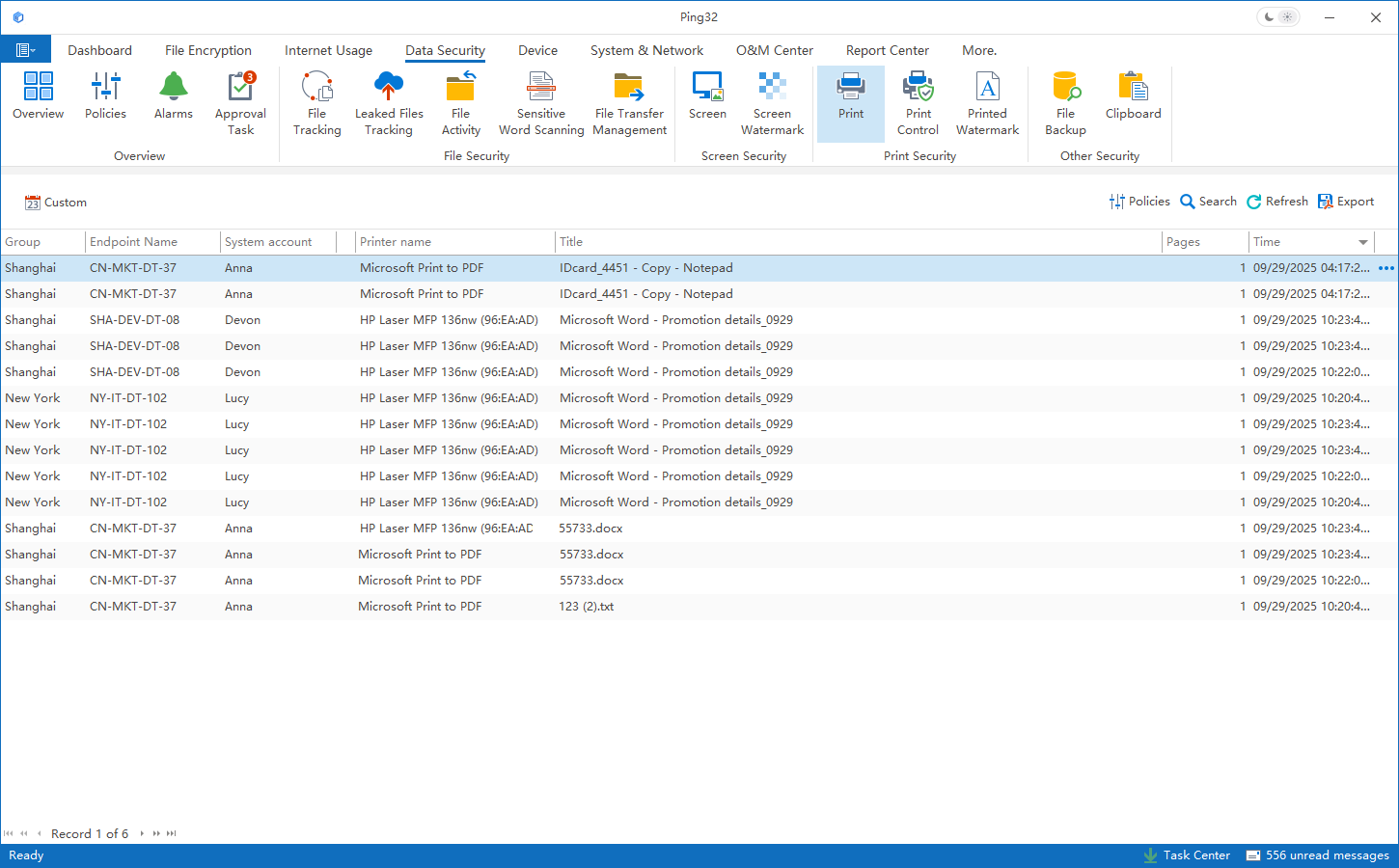
In real-world scenarios, employees printing contracts, customer lists, or technical documents is completely normal. But without necessary restrictions and auditing, these actions themselves can become “data externalization risks.” This is especially true in organizations with outsourced collaboration, temporary projects, and frequent personnel movement, where print-related risk is more easily amplified.
More complex still, some companies have built relatively complete controls for file externalization, web uploads, and USB peripherals, but printing remains a long-standing “exception.” Fragmented policies lead to inconsistent protection strength across data paths, increasing overall governance complexity and management costs.
The practical challenge: Why companies “know it matters” but can’t truly implement it
Most companies are not unaware of printing risk. The real difficulty is that print control is often seen as “important but hard,” so it tends to stay at the level of written rules or verbal reminders, lacking an executable and sustainable system capability. The main obstacles include:
-
Wide variation in needs: Different roles rely on printing to very different degrees, making uniform restrictions hard to fit.
-
Traditional solutions are device-centric: They can see printer status or jobs, but it’s hard to manage “how data flows.”
-
Simple bans are not feasible: A one-size-fits-all approach hurts business continuity and office efficiency.
-
Hard to link people, endpoints, and files: Without the ability to correlate “who printed what on which endpoint,” auditing and accountability become difficult.
-
Insufficient evidence chain: Post-incident records are incomplete, making it hard to support compliance audits or risk reviews.
-
Tool fragmentation: Printing, USB, file externalization, etc. are often managed by different systems, making it hard to form unified policies and coordinated enforcement.
So companies end up stuck in a dilemma: no control accumulates compliance and leakage risk; strong control may hurt efficiency and user experience. In the end, printing falls into a “gray zone”—no clear rules and no technical support—remaining a long-term weak point in the data security system.
The Ping32 approach: Making print control executable within an endpoint management system
Ping32 does not position print control as an isolated functional module. Instead, it treats printing as a natural part of endpoint management and DLP. The core idea is not to “restrict printing,” but to bring printing behavior back into a governance scope that is visible, controllable, and auditable.
Within Ping32’s endpoint management framework, printing is treated as a special form of “file externalization.” Whether it is a local printer or a network printer, the system can identify print actions on the endpoint and associate them with the user, endpoint, file source, and file attributes—this is the foundation for all subsequent auditing and policy enforcement.
Through a unified policy engine, organizations can set differentiated rules by role, department, and endpoint. For example: ordinary documents can be printed freely; files containing sensitive keywords, originating from specific directories, or coming from specific business systems can trigger approval, warnings, or blocking. Policies are executed automatically based on rules, reducing manual judgment and management burden.
At the same time, Ping32 does not require organizations to build complex policies from day one. It supports enabling print auditing first, continuously recording print behavior without changing employees’ habits. Based on real data, administrators can gradually identify which files are printed frequently and which roles are more likely to print sensitive content—providing objective evidence for later policy optimization.
Print audit trails: Providing baseline facts for management and compliance
In the early stages of print governance, “log first, optimize later” is often more realistic than “restrict immediately.” Continuous, stable print auditing helps organizations build an understanding of actual usage instead of relying on assumptions or isolated incidents.
Ping32’s print auditing focuses on “behavior,” not just device logs. It can correlate print activity with user identity, endpoint assets, and file attributes, providing a multi-dimensional data foundation for analysis. This data supports internal management and also serves as objective evidence in compliance audits, customer assessments, or security reviews.
More importantly, the value of audit trails is not “monitoring individuals,” but enabling organizations to see the real paths through which data moves on endpoints. By analyzing dimensions such as print frequency, file types, and departmental distribution, managers can more accurately identify high-risk scenarios and develop governance strategies that better fit the business.
Policy enforcement: Constraining high-risk behavior without breaking efficiency
Once enough audit data is accumulated, print control can gradually enter the “policy enforcement” stage. Ping32 supports rule-based policy configuration, enabling a more refined balance between security and efficiency.
Policies are not limited to “allow/deny.” They can combine reminders, approvals, confirmations, and logging for more flexible governance. For example: before printing a sensitive file, users can be warned of the risk; when necessary, additional confirmation or approval can be required. This both raises awareness and avoids backlash or inefficiency caused by overly rigid enforcement.
Print policies can also stay aligned with other endpoint behavior policies. If a class of files is already restricted for USB export or web upload, print policy can maintain an equivalent level of control, avoiding “uneven strength” across data paths that creates governance conflicts.
A gradual rollout path: Turning print control into a sustainable capability
Given the realities of small and medium-sized businesses, print control is better implemented step by step rather than through complex rules all at once. A more robust rollout typically looks like this:
-
Start with auditing and logging: Build visibility and understand print distribution and real usage.
-
Identify risk based on data: Pinpoint high-frequency printing and high-sensitivity scenarios, and define priorities.
-
Apply controls at key points first: Cover critical roles and critical file types first, introducing reminders/approvals/logging mechanisms.
-
Iteratively optimize rules and experience: Reduce disruption to normal operations and form stable, sustainable governance.
-
Unify within endpoint governance: Coordinate with file externalization, web upload, and USB policies to govern behavior consistently.
With a gradual approach, print control stops being an “extra burden” and becomes a natural evolution of endpoint management—continuously strengthening data security while protecting business continuity.
Summary: Print control is an essential part of a DLP program
As DLP continues to move toward more refined governance, the importance of print control is being recognized again. The goal is not to eliminate printing, but to bring it back into a manageable and auditable scope.
What Ping32 provides is not a single “print control” feature, but a practical path for integrating printing into the broader endpoint management and DLP framework. Through audit trails, policy enforcement, and gradual rollout, organizations can improve control over data movement without significantly increasing complexity.
FAQ
Does print control require deploying a dedicated print server?
Not necessarily. Endpoint-side control can identify behavior and create audit trails without changing the existing printing architecture.
Does print auditing record the actual printed content?
The system primarily records information related to print behavior (user, time, endpoint, file source/attributes, etc.). Whether content is recorded and how it is recorded can be configured according to company policy.
Can we do auditing only, without print restrictions?
Yes. Auditing and control policies are independent, and organizations can enable them gradually in different phases.
Will print control affect employees’ normal productivity?
With reasonable policy design, most day-to-day printing is unaffected, while controls focus on high-risk scenarios.
Can print control be managed together with file externalization and web uploads?
Yes. Printing can be included in a unified endpoint management and DLP policy system, supporting coordinated governance and unified logging.





 Contact


 10 min


