As digital workplaces continue to evolve, the web browser has become one of the most common gateways for daily work. Employees use browsers to access internal business systems, consume cloud services, and interact with a growing number of third-party platforms. As a result, more and more file-sharing and file-exfiltration activities are now happening through browser-based uploads.
Compared with email, instant messaging tools, or portable storage devices, browser upload pathways are often more concealed, less predictable, and far more complex in terms of destination. Browser-based exfiltration can easily blend into normal web access patterns, making it one of the hardest challenges in modern data leakage governance.
To improve visibility and traceability in browser scenarios, Ping32 is officially introducing a new capability—Smart Leak Application Analysis—built on top of its existing leakage tracing foundation. This feature significantly enhances Ping32’s intelligent analysis of browser file uploads. When a file is being uploaded through the browser, Ping32 can accurately identify and pinpoint the target upload domain, providing stronger evidence for risk assessment, incident investigation, and downstream response actions.
1. Browser Uploads Are Becoming a “Blind Spot” in Leakage Tracing
In real-world enterprise security operations, security teams are already familiar with outbound file activities. Files shared through email, IM apps, USB drives, and other channels typically have clearer pathways and more explicit recipients, which makes them easier to monitor, log, and audit.
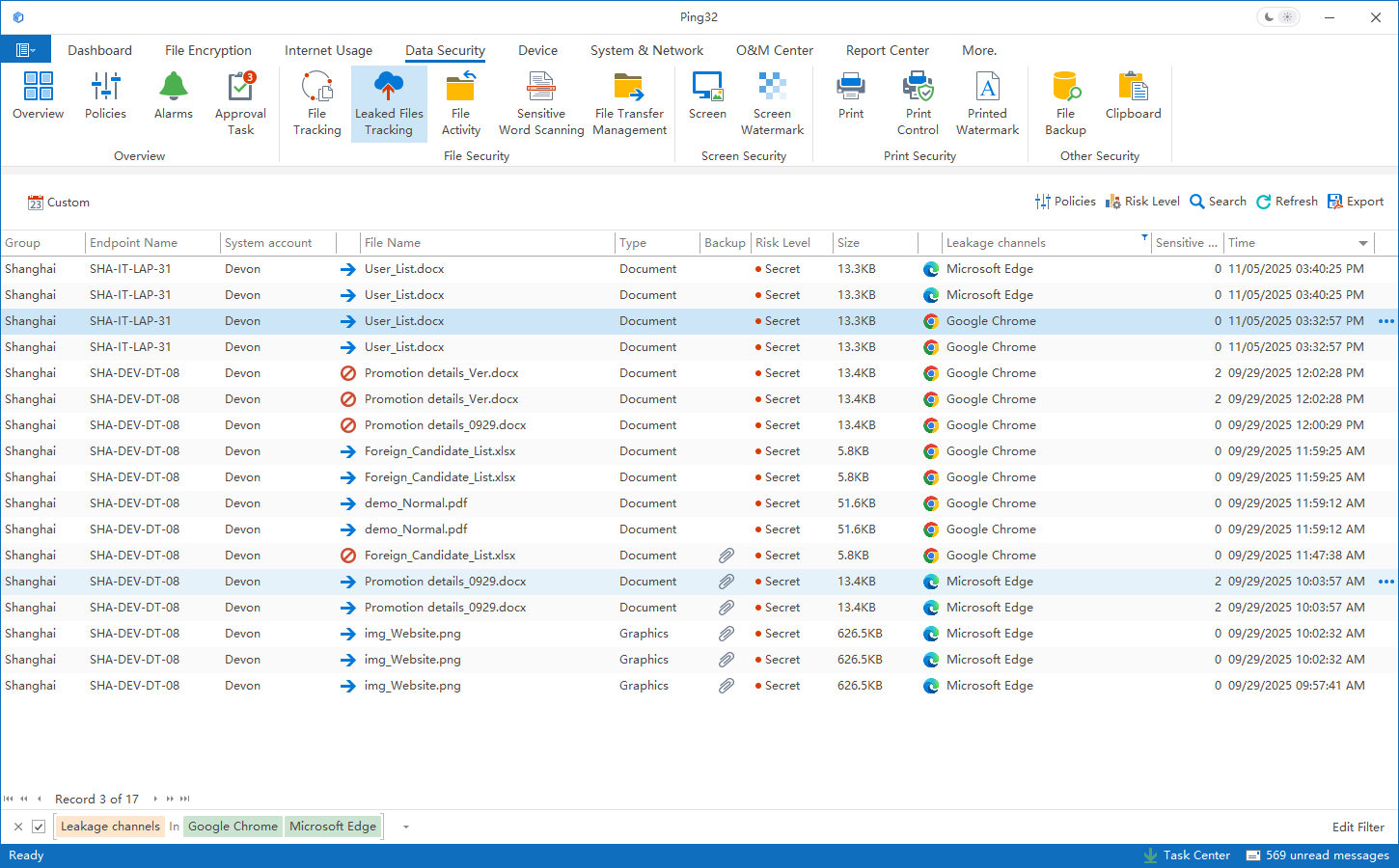
However, the browser upload scenario behaves differently. In day-to-day work, employees may upload files to cloud drives, webmail portals, partner platforms, or even temporary websites used for ad-hoc tasks. These behaviors introduce several unique characteristics:
1) Diverse and constantly changing destinations
Files may be uploaded to all kinds of cloud storage services, web-based email systems, or third-party business platforms. Destinations usually appear as domains, and they can change frequently over time.
2) Limited visibility due to HTTPS encryption
Browser uploads are typically conducted over HTTPS-encrypted communication. From a network-only perspective, it is often difficult to reconstruct the real destination or validate what actually happened.
3) Mixed into normal web activity
Uploads occur within legitimate webpage access flows, making it difficult to simply classify them as “business behavior” or “risky behavior” based on traffic alone.
4) Lack of clear “destination evidence”
Even if an upload is detected, many organizations can only confirm that “an outbound event occurred,” but cannot reliably answer the key question: “Where did the file go?”
Because of these realities, browser uploads are now a high-frequency leakage-tracing scenario—and also one of the most overlooked. Traditional leakage tracing often identifies the result (“a file was sent out”) but struggles to restore the process (“how and where it was uploaded”), leaving risk rating and management decisions without enough dependable evidence.
2. Feature Overview: What Is “Smart Leak Application Analysis”?
Smart Leak Application Analysis is an enhanced leakage tracing capability introduced by Ping32 specifically for the browser file upload scenario. By deeply analyzing browser upload behavior, it enables intelligent identification and analysis of both the outbound application context and the upload domain.
Its core goal is simple and practical:
Make browser uploads traceable—see the destination, clearly identify the target, and assess risk with confidence.
With this feature, when Ping32 detects a file being uploaded through the browser, it can further identify and record the actual destination domain. This domain information is then correlated with leakage events, file content, and risk rating workflows—forming a more complete and actionable incident picture.
3. From “Detecting Exfiltration” to “Identifying the Destination”: The Key Value of This Upgrade
1) Precisely identify upload domains and close a critical gap in tracing
In browser upload scenarios, “where it was uploaded” is often more meaningful for risk judgment than merely “what was uploaded.” With Smart Leak Application Analysis, Ping32 can accurately pinpoint the upload domain at the time the file transfer occurs, enabling security teams to clearly understand the outbound target.
This means leakage tracing no longer stops at the behavior level. It extends into the destination object and propagation direction, significantly improving the completeness and investigability of each event.
2) Introduce domain intelligence into the leakage analysis perspective
Different domains imply very different risk profiles:
-
Uploads to enterprise-approved or commonly used business systems are generally more controllable.
-
Uploads to public cloud storage or unknown third-party platforms typically represent higher risk.
-
Uploads to domains unrelated to business operations may indicate policy violations, shadow IT usage, or potential leakage intent.
By adding the domain dimension, Ping32 provides a more structured and multi-layered lens for leakage analysis—making follow-up risk rating and response actions more accurate, evidence-driven, and defensible.
4. How the Smart Analysis Works in Practice
When running in real environments, Smart Leak Application Analysis performs multi-level correlation and interpretation of browser upload behaviors, mainly in the following areas:
1) Reconstruct the complete upload context
The system does not only record “an upload happened.” It builds a richer context for investigation and triage, including:
-
The timestamp of the upload event
-
The initiating endpoint and user identity
-
The browser process and the accessed page context
-
The file’s name, type, and size
Together, these elements form a complete leakage incident profile and help eliminate “isolated alerts” that are hard to interpret.
2) Accurately extract and record the destination domain
Once Ping32 identifies that a file was sent out via browser upload, it performs deeper parsing of the upload activity and extracts the target domain with high precision. This domain becomes a key attribute stored in the leakage event record.
As a result, analysts can immediately see where the file went—without relying on manual browser history checks or additional forensic steps.
3) Provide a stronger data foundation for risk rating
Because domain information is an essential indicator of potential impact and propagation scope, Ping32 integrates it into its leakage analysis and risk evaluation framework. This makes risk judgment closer to reality, rather than relying solely on file content sensitivity or behavioral frequency.
5. How It Works with Ping32’s Existing Leakage Tracing System
Smart Leak Application Analysis is not an isolated feature—it is designed to integrate tightly with Ping32’s existing data leakage tracing capabilities:
-
Combined with outbound file logging and auditing to form a complete event chain
-
Coordinated with sensitive content identification to evaluate business value and data risk
-
Linked with leakage risk rating mechanisms to support event tiering and response prioritization
Through this unified design, browser upload events are brought into the same governance framework as other channels—eliminating browser uploads as an “exception scenario” and reducing operational blind spots.
6. Typical Use Cases
Scenario 1: Files uploaded to unknown third-party platforms
When an employee uploads files to personal webmail or private cloud drives via browser, Smart Leak Application Analysis records the destination domain clearly. This provides direct evidence for determining whether the activity is compliant with corporate policies.
Scenario 2: Rapid investigation after a sensitive file is exfiltrated
After detecting an outbound incident involving sensitive data, security teams can immediately locate the true upload destination from the event details—without repeatedly searching browser logs—dramatically reducing investigation time.
Scenario 3: Supporting compliance and audit requirements
For organizations that must satisfy compliance audits or internal investigations, clear domain records help build a more complete, reviewable evidence chain—strengthening accountability and improving audit readiness.
7. What Changes for Security Operations and Management Decisions
By introducing Smart Leak Application Analysis, Ping32 improves browser upload governance in three meaningful ways:
-
Higher visibility: not just knowing “an upload occurred,” but clearly seeing “where it was uploaded.”
-
Stronger judgment: assessing potential impact more accurately using domain-based risk intelligence.
-
Faster response: enabling investigation, communication, and management decision-making with clearer evidence.
This reduces the analysis burden on security teams while enabling executives and stakeholders to understand leakage risk more intuitively.
8. Frequently Asked Questions (FAQ)
Q1: Why does browser file upload require dedicated smart analysis?
A: Browsers have become a major channel for outbound file transfers, but upload behavior often hides within normal web access. Destinations appear as domains and change frequently, while traditional approaches struggle to accurately determine where files are uploaded. Smart Leak Application Analysis provides deeper parsing and closes the visibility gap in browser scenarios.
Q2: What problem does Smart Leak Application Analysis primarily solve?
A: It focuses on a core challenge: after a file is uploaded via browser, organizations often cannot reliably determine the true destination. Ping32 presents the upload domain directly within the leakage event, helping teams understand the outbound target quickly and supporting accurate risk assessment and analysis.
Q3: Will this feature affect normal browsing or business workflows?
A: No. Smart Leak Application Analysis focuses on identifying and tracing upload behavior and recording evidence. It does not change user workflows or disrupt access to business systems and standard web services.
Q4: Why is domain information valuable in leakage analysis?
A: Different domains represent different propagation ranges and potential impacts. Introducing domain intelligence enables security teams to distinguish legitimate business uploads from high-risk outbound behaviors, improving analytical accuracy and decision-making efficiency.
Q5: How does it work with Ping32’s existing leakage tracing capabilities?
A: It extends Ping32’s leakage tracing by integrating with outbound file logs, event analysis, and the risk rating framework—ensuring browser upload incidents are managed under a unified governance perspective and preventing browser scenarios from becoming a blind spot.
9. Continuously Evolving Data Leakage Governance
Data leakage governance is not a one-time project—it is a continuous evolution. Ping32 continues to iterate based on real enterprise usage patterns and operational needs. Smart Leak Application Analysis is a key reinforcement designed specifically for the high-frequency and complex browser upload scenario.
Looking ahead, Ping32 will keep enhancing leakage tracing and analytical capabilities to help enterprises build a more resilient, controllable data security system in increasingly complex digital environments.
As browsers become a primary channel for outbound file transfers, organizations must be able to clearly understand the destination of files to make accurate risk judgments. With the introduction of Smart Leak Application Analysis, Ping32 strengthens leakage tracing through deep browser upload analysis and precise domain identification—closing a critical gap in data leakage governance and enabling more reliable investigation, assessment, and response.





 Contact


 11 min


