How to Change the Server IP Address from the Endpoint Agent Host
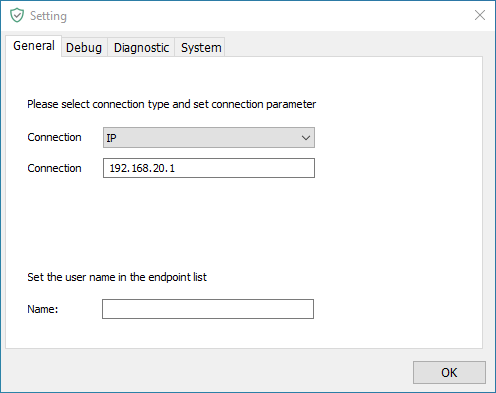
Endpoint Agent connection parameters are important configuration information for establishing communication between the endpoint agent and the server. The connection parameters can be set to the server internal/external network IP, private domain name or public domain name. In actual applications, appropriate connection parameters should be selected based on deployment and access requirements to ensure normal […]
Endpoint Agent connection parameters are important configuration information for establishing communication between the endpoint agent and the server. The connection parameters can be set to the server internal/external network IP, private domain name or public domain name. In actual applications, appropriate connection parameters should be selected based on deployment and access requirements to ensure normal communication between the endpoint agent and the server.
Steps to modify connection parameters
nsec -setting
- If you are installing the endpoint agent for the first time, you need to execute this command after the endpoint agent completes the restart.
- Enter the password in the pop-up password box and click "OK" to open the endpoint agent settings center
CMD opening method
Method 1: Open command prompt via search
- Open the Start menu: Click "Start" (Windows logo) in the lower left corner of the Windows taskbar
- Search for Command Prompt: Enter "Command Prompt" or "cmd" in the search box
- Open the command prompt: Click "Command Prompt" in the search results to open
Method 2: Open Command Prompt via shortcut
- Press the keyboard key combination
Win + Rto open the Run dialog box - Enter
cmdin the dialog box and click "OK" to open the command prompt
Updated


