Software governance is one of the most contentious areas in endpoint security. Excessive openness lets pirated, non-compliant, or malware-laden software into the internal network; excessive strictness handcuffs everyday productivity. Most organizations cycle through “strict at launch, loosening over time.” The underlying reason is that software governance has been treated as a static policy rather than a dynamic closed loop. The Ping32 console integrates software block/allow lists, install requests, software store, and run-time interception into a single governance loop so that the program can evolve with real business needs.
Why software governance needs a closed loop rather than a single policy
Software is not a static object. New versions ship every day, new tools appear, new business needs push for new software. A single static policy only matches the enterprise at one point in time, not through the evolution. Block lists cannot cover every new risk, and allow lists cannot cover every new legitimate need. The value of a closed loop is to connect both ends: discovery, approval, cataloging, delivery, execution, and audit move along the same line.
The second value is pulling employee demand into the workflow. Employees are not the opposite of governance. They are also the first line in discovering new tools, assessing software value, and spotting anomalies. Turning “install request” into a formal entry point makes governance more effective than treating employees purely as subjects to control. Ping32 embeds employee-side demand into the loop through the software store, install requests, and approval workflow.
Common overlooked issues in software governance
The most common misstep is a blanket ban. Blocking everything outside the allow list looks strict but in reality pushes employees to bypass: downloading from personal devices, running portable versions, or substituting cloud services for local installs. Bypasses do not just nullify governance; they shift the risk into channels that are harder to monitor.
A second underweighted issue is the long-term maintenance cost of the allow list. Software versions update constantly. Old versions may carry already-patched vulnerabilities, new versions may change behavior. If the allow list locks only by name, every version is let through; if it locks by specific version, someone must keep chasing upgrades. Ping32 supports four granularities in software identification – name, publisher, file fingerprint, and version range – letting administrators choose the depth of lock appropriate to each software’s importance. The console workflow follows below.
The operating path for configuring the software governance loop in the Ping32 console
This section follows the administrator’s working order across five stages: software inventory, block/allow list policy, software store, install request, and run-time audit.
Take inventory of the current software library
Log into the Ping32 console and open “Software Management -> Software Library.” Ping32 aggregates software installed across every client endpoint, grouping by software name, publisher, version, endpoint count, and first discovery time. Administrators can filter for enterprise-wide high-install software, anomalous software present on only a few endpoints, and suspicious software with an unknown publisher. Each software entry can be tagged manually: authorized, blocked, under observation, or pending review.
Establish block/allow list policies
Open “Software Management -> Run Control -> Allow/Block List.” Ping32 supports two modes: block list (allow by default, intercept on hit) and allow list (block by default, permit on hit). Match the mode to role sensitivity: R&D, finance, legal, and other high-sensitivity roles use allow list mode; general office roles use block list mode. Each policy can additionally configure notification popups, interception actions, alert triggers, and compliance trails.
Build a software store as the compliant entry
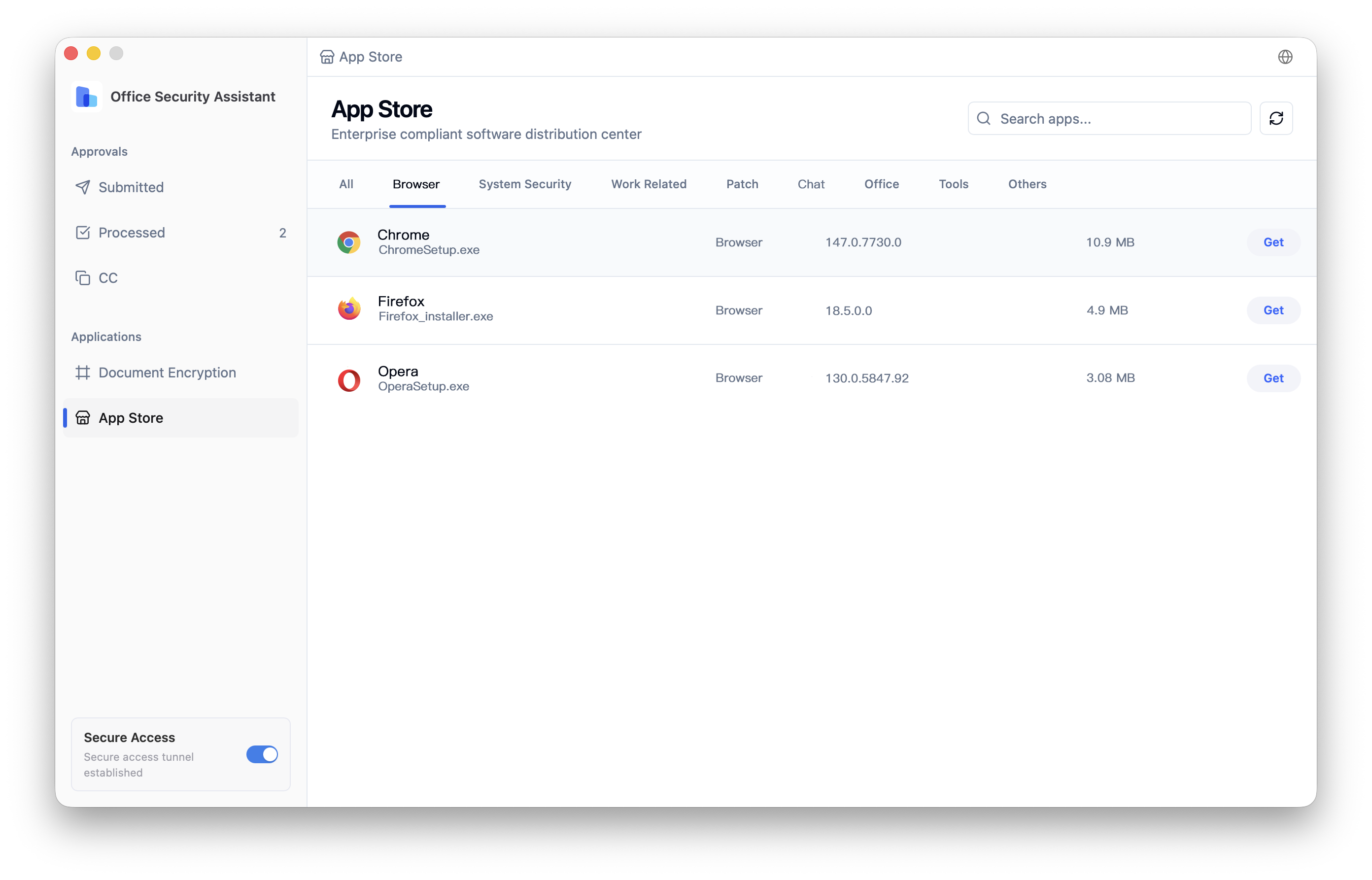
In “Software Management -> Software Store,” set up the enterprise software store. Administrators upload security-reviewed software to the store, and employees install with a single click from the store entry in the Ping32 client. The store supports categorized display by department and role, so employees do not face a wall of irrelevant options. Each entry records install count, last update time, reviewer, and review conclusion for audit traceability.
Configure the install request workflow
Open “Software Management -> Install Request” to enable the request flow. When an employee encounters software outside the allow list, they raise a request at the endpoint containing the software name, intended use, expected duration, and department. Ping32 routes the request through the configured flow to the information security role for evaluation. Once approved, the software is either added to the store or released as a single-use exemption. Every request leaves a complete record covering requester, reviewer, review conclusion, and final disposition.
Review run-time audit and alerts
Once the policy is active, open “Software Management -> Software Run Records” to review every launch event. Ping32 captures launching employee, endpoint, software fingerprint, launch time, matched policy, and interception result. For three patterns – “repeated launch attempts after interception,” “newly appearing unregistered software,” and “software with anomalous publisher” – Ping32 raises alerts under “Data Security Alerts -> Software Alerts.” Review alert distribution weekly to identify software that should be promoted to the block list and tools that should be added to the allow list.
Turning software governance into a long-lived capability inside Ping32
Software governance is one of the areas that most needs continuous operation in endpoint security. Establish a monthly rhythm inside Ping32: refresh the software library inventory monthly, review average request duration and approval rate, audit software store updates, and evaluate alert distribution. Each cycle leaves a full record inside Ping32, giving next quarter’s policy evolution a solid basis.
The core idea Ping32 applies to software governance is “make compliance easier than bypass.” When the software store, install request, and approval workflow deliver a smooth compliant path, employees naturally choose the compliant route. When the allow/block list, run-time audit, and alert review form a full monitoring chain, real risks surface on their own. What an enterprise really needs is not a policy so strict that it cannot be executed, but a closed loop where every software action is visible, reviewable, and recorded. That is the core direction of Ping32 in software management, and the path that turns software governance from a static policy into an executable capability.





 Contact


 6 min
6 min 


