How to Uninstall the Endpoint Agent
This article explains how to uninstall the Ping32 endpoint agent, authorization recycling, and data retention considerations. Depending on the operation and maintenance goals, you can choose: Uninstall/remove endpoint from server side Uninstall locally from endpoint agent Recommendation: If audit traceability, compliance retention or evidence collection requirements are involved, please carefully select operations such as "clean […]
This article explains how to uninstall the Ping32 endpoint agent, authorization recycling, and data retention considerations. Depending on the operation and maintenance goals, you can choose:
- Uninstall/remove endpoint from server side
- Uninstall locally from endpoint agent
Recommendation: If audit traceability, compliance retention or evidence collection requirements are involved, please carefully select operations such as "clean data/delete endpoint". Complete internal approval and data backup if necessary.
Uninstall from the server side
Note: Unless there is a clear purpose such as recycling authorization, it is generally not recommended to delete the endpoint directly from the server side, so as not to affect data retention and subsequent traceability.
Operation steps
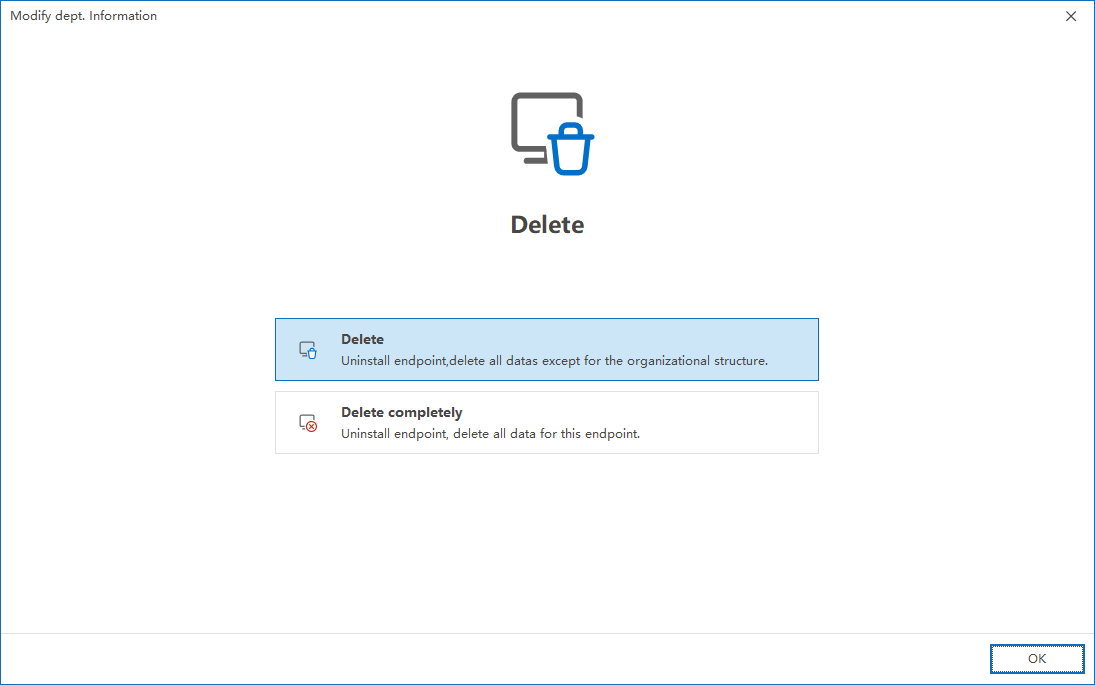
"Delete endpoint" and "Completely delete endpoint" instructions
- Trigger endpoint agent uninstall
- Clean historical audit data
- Release Authorization
- The endpoint object remains in the organizational structure (often used in security domain/organizational structure management scenarios related to encryption modules)
- Trigger endpoint agent uninstall
- Clean data
- Release Authorization
- The endpoint object will be removed (no longer retained in the organization structure)
Risk warning: Both of the above operations involve data cleaning. Please confirm whether there are compliance retention requirements before execution, and complete data export/backup or internal approval if necessary.
Only release the license and retain the data (recommended for machine replacement/migration/license recycling)
If the requirement is: The endpoint needs to be offline or reinstalled, but you want to retain the historical data on the server side for audit and traceability, and at the same time revoke the authorization, it is recommended to only perform the authorization recovery operation:
Note: This method is used to make authorization management more controllable and avoid accidentally deleting data or destroying traceability links.
Uninstall locally from the endpoint agent
This method is suitable for scenarios where the endpoint cannot communicate normally with the server, or uninstallation needs to be performed locally on the endpoint. In order to avoid uninstallation failure due to misoperation or version differences, please contact the vendor's manual customer service/technical support to obtain the uninstallation command and parameters, and confirm before execution:
- Endpoint Agent version and command adaptation
- Does it require administrator rights to run
- Whether there is an uninstall protection/anti-tampering policy (if necessary, follow the process to remove it first)
Note: After the endpoint agent is installed for the first time, it must be restarted before the uninstall command will take effect. If it is executed directly without restarting, it may prompt "not an internal command" and other abnormal messages.
Updated


