How to Configure Audit Data Retention
By enabling the data cleaning capability of the Management Console, audit logs and their associated files can be automated lifecycle management based on the "retention days": the system will regularly identify and clean up data that has exceeded the retention period, helping to reduce storage usage while meeting the company's data retention policy requirements. Enable […]
By enabling the
data cleaningcapability of the Management Console, audit logs and their associated files can be
automated lifecycle managementbased on the "retention days": the system will regularly identify and clean up data that has exceeded the retention period, helping to reduce storage usage while meeting the company's data retention policy requirements.
Enable data cleaning
1. Enter the Management Console
System Settings2. Open
Data Maintenance3. Turn on the
Data Cleaningswitch
Description- After turning it on, the system will clean up data that has exceeded the retention period according to policies.
- The data to be cleaned usually includes: log records, audit logs and related archives/associated files (subject to the actual cleaning scope configuration).
- Cleaning is an irreversible operation: after the expired data is deleted, you will not be able to continue querying or backtracking on the Management Console.
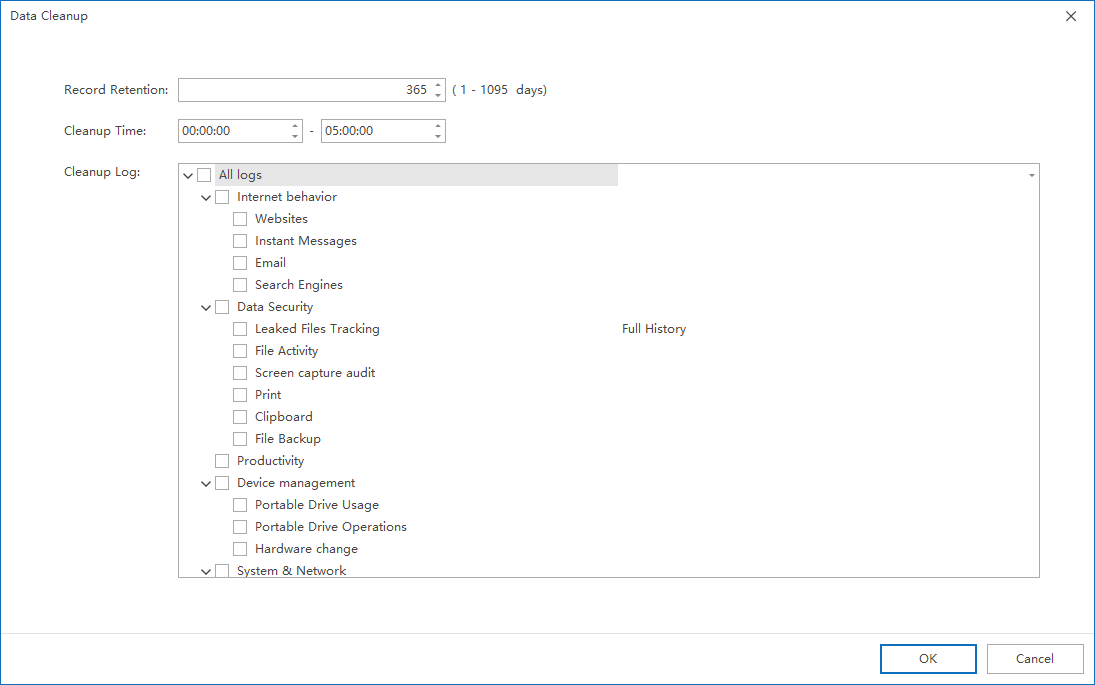
Configure retention days and cleanup scope
1. Click
Parameter Settingson the
Data Maintenancepage
2. Complete the following configuration in parameter settings:
- Data retention time (number of retention days): Define the upper limit of the life cycle of data
- Cleaning Scope/Log Type: Select the specific data categories that need to be included in the cleaning
- The number of retention days should be determined comprehensively based on the company's compliance requirements, audit traceability period and storage capacity planning.
- If scenarios involving evidence collection, internal control audits, etc. are involved, it is recommended to evaluate the impact on the traceability link before adjusting the retention policy.
Supplementary explanation: Cleanup Policy for Data Leak Tracing
- Data Leak Tracing supports finer cleaning granularity: you can choose to only clean the outgoing files of the "Data Leak Tracing Backup", and keep the corresponding tracking records without deleting them.
- This policy is suitable for scenarios where "you want to keep the event evidence chain (record) but control the file storage occupation".
Updated


