How to Block Employees from Sending Files via WeChat
WeChat has become a common communication tool in corporate offices, but it is also one of the important channels for outsourcing documents. For enterprises that want to restrict the delivery of business files through instant messaging software, they can use Ping32's File Outgoing Control to establish directional rules for the WeChat process to achieve more […]
WeChat has become a common communication tool in corporate offices, but it is also one of the important channels for outsourcing documents. For enterprises that want to restrict the delivery of business files through instant messaging software, they can use Ping32's
File Outgoing Controlto establish directional rules for the WeChat process to achieve more targeted outgoing restrictions.
The advantage of this approach is that it does not have to directly block all outgoing channels. Instead, it can focus on high-risk software, key file types, or highly sensitive content to achieve more precise control. For scenarios where it is necessary to retain normal office flexibility while reducing the risk of sending files casually, this type of strategy is usually easier to implement.
Configuration steps
1. Click
Data Security→
Policyon the console to enter the data security policy settings page.
2. In the data security policy settings page, click
File Security, turn on
File Outgoing Control, and click
Parameter Settings.
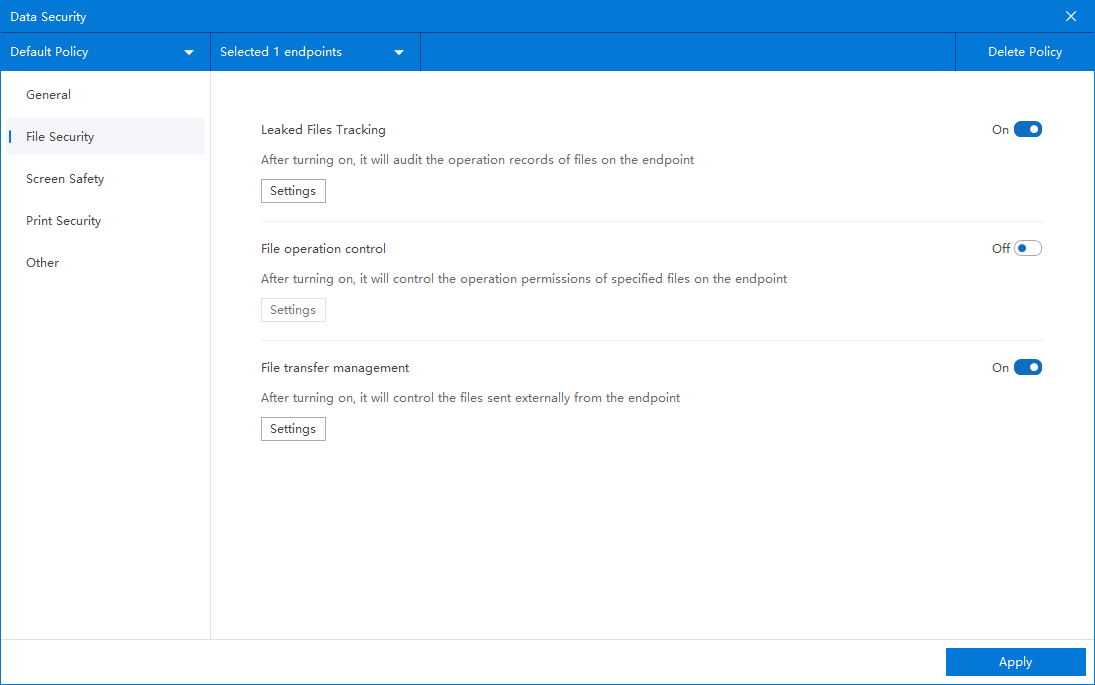
3. Click
Addon the outbound file transfer control setting interface to create outbound file transfer control rules, and configure the following options as needed:
APP OPTIONS:
- Check Customize Program
- Click the "Customize program settings" button
- Add WeChat application process (the process name shall be subject to the actual one)
:
- Default: All files (control all outbound files)
- Composite rules: Accurate control can be based on file type, file size, and whether the file content contains sensitive words
- Used to control only core files and not ordinary files.
:
- Off by default
- If you need to prompt employees when outbound files are blocked (for example, "This file is prohibited from being sent out"), you can open a pop-up window and set the prompt content.
- This prompt message will be displayed when employee outsourcing is controlled
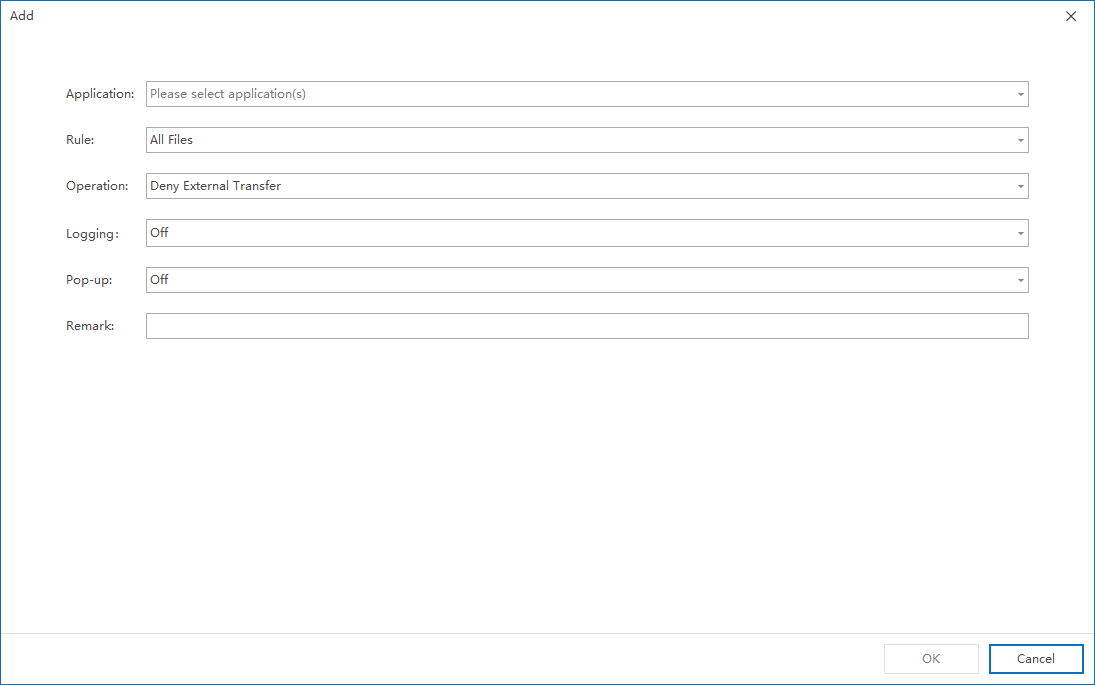
4. Click
OKafter the rule configuration is completed.After confirming that the policy application endpoint is correct, click
Applyto deliver the outbound file transfer control policy to the endpoint.
5. After completing the above configuration, you can implement
Prohibit employees from sending files out via WeChat.
Validation verification and implementation suggestions
It is recommended to send a test file that meets the control conditions through WeChat on the test endpoint to confirm whether the endpoint has been correctly intercepted, and check whether the pop-up prompt content is clear and meets the company's internal management standards. If you want to restrict only core files and allow ordinary files, it is recommended to use
composite rulesfor fine-grained control.
- The process name added in Customized program should be based on the actual process on the endpoint. It is recommended to verify it on the test endpoint before official release.
- If there is indeed an exception requirement in the business, an exception processing path can be designed in conjunction with approval or other supporting processes to avoid long-term reliance on temporary release.
- For outgoing instant messaging scenarios, it is recommended to pay attention to file type, size and content sensitivity at the same time, rather than making a single restriction based on the application dimension.
Updated


