How to Configure Dual-Network Connectivity for the Endpoint Agent
Usage scenarios Dual Network Connection function is designed to improve the endpoint agent's connection reliability in a mixed network environment. In common scenarios, endpoint agents usually connect to the server through the intranet IP address to obtain optimal access performance and security. When the endpoint agent detects that the internal network connection is unreachable (for […]
Usage scenarios
Dual Network Connectionfunction is designed to improve the endpoint agent's connection reliability in a mixed network environment.
In common scenarios, endpoint agents usually connect to the server through the intranet IP address to obtain optimal access performance and security. When the endpoint agent detects that the internal network connection is unreachable (for example, due to network isolation, firewall policies, or the user is in an external network environment), it will automatically and seamlessly switch to a preconfigured backup IP address (usually a public Internet address) to reinitiate the connection.
This mechanism ensures continuous availability of services without manual intervention by users, significantly enhancing the system's fault tolerance and user experience.
Configuration steps
1. Hold down
Shiftand click
System Settingsto enter the
Advanced Settingsinterface.
2. In the
Advanced Settingsinterface, click
Others-> turn on
Dual Network Connection(turn the slider to the right), click
Parameter Settings3. In the
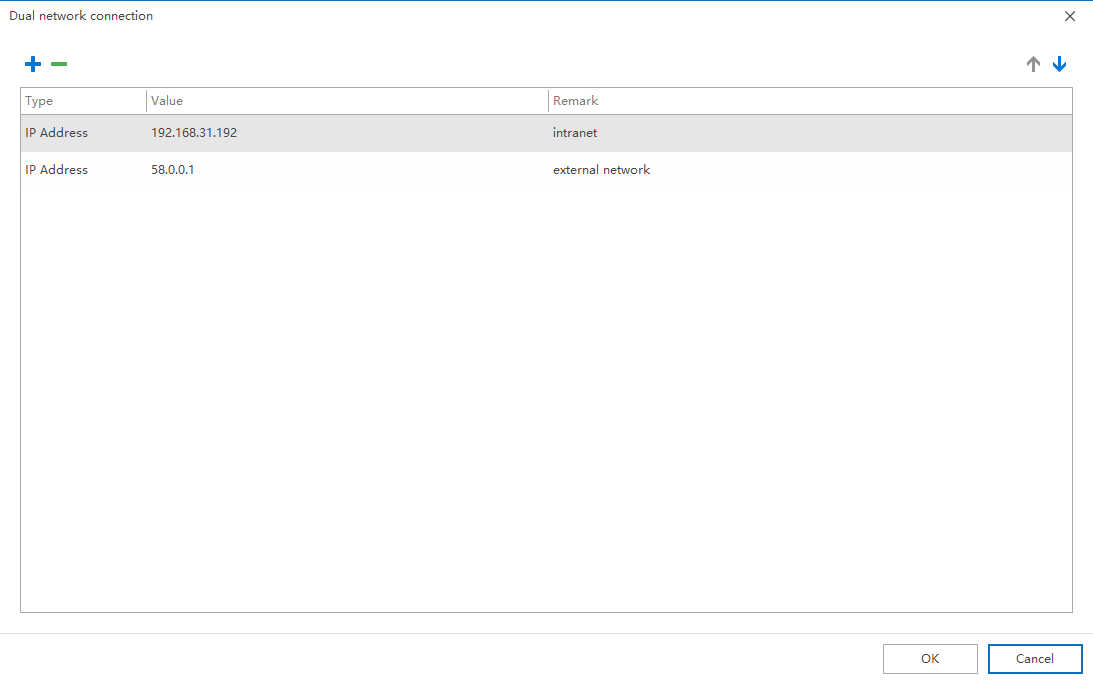
Parameter Settingswindow, click
+to add, add the internal IP and public IP to the list in turn, and click
OK.
4. Select the endpoint where the policy takes effect and click
Applyto complete the configuration.
Precautions
Precondition: This policy can only take effect when the endpoint agent is online normally. If the endpoint agent is not online, the new policy configuration cannot be obtained and applied.Priority: There is a priority concept for dual-network connections. The smaller the IP address value, the higher the priority.Switching timing: The endpoint agent checks every 3 minutes, that is, after the endpoint agent is offline for 3 minutes, the endpoint agent will automatically switch the connection parameters.Switching order: The endpoint agent switches IP addresses in order of priority until it switches to the IP address with the lowest priority.- When using a public IP to connect to the server, please ensure that the network between the public Internet and the server is unobstructed and that port mapping and other operations have been completed.
- If endpoint agent switching fails, you can check whether the endpoint agent has received the policy by checking the endpoint agent policy file.
Updated


