How to Back Up All Files and Deleted Files on Employee Endpoints
In enterprise data security management, file backup can be used to establish a baseline of employee endpoint files and to retain evidence copies of deleted files. For scenarios that need to take into account pre-preservation, post-event recovery and audit evidence collection, it is recommended that administrators plan in the file backup strategy first full disk […]
In enterprise data security management,
file backupcan be used to establish a baseline of employee endpoint files and to retain evidence copies of deleted files. For scenarios that need to take into account pre-preservation, post-event recovery and audit evidence collection, it is recommended that administrators plan in the
file backupstrategy
first full disk backupand
backup when files are deleted, covering "full basic backup" and "key deletion behavior traces" respectively.
It should be noted that the goals of full disk backup and deleted file backup are not the same. The former is more suitable for establishing an initial backup baseline to facilitate subsequent recovery, migration, and audit troubleshooting; the latter is more suitable for retaining evidence when files are deleted to facilitate verification of accidental deletion, malicious deletion, or audit evasion. Therefore, the management objectives should be clarified before implementation, and then decide whether to activate one of them individually or both at the same time.
Back up all files on employee endpoints
1. Click
Data Security→
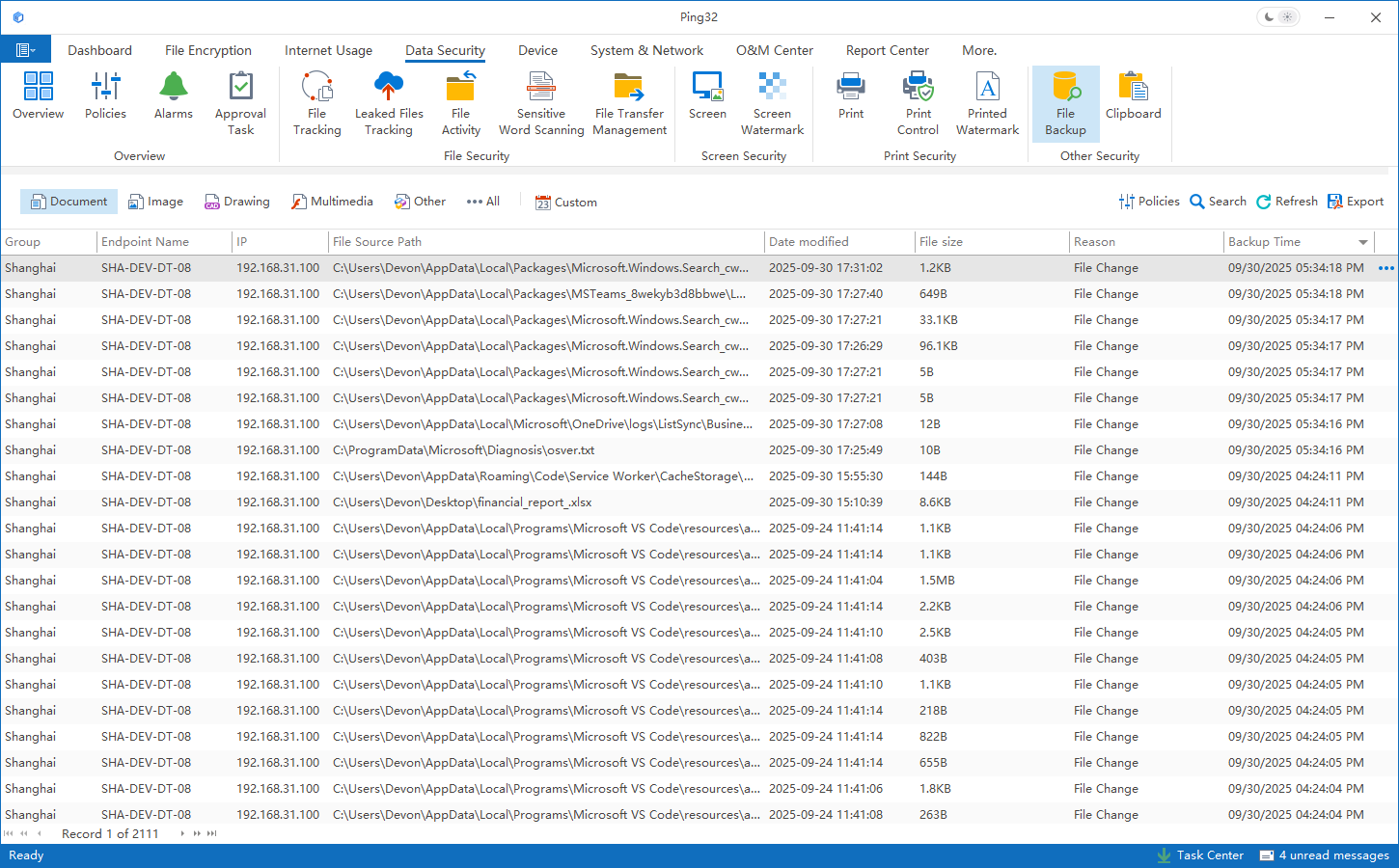
File Backupon the console to enter the file backup audit record interface.
2. Click
Policyto enter the backup policy setting interface.
3. Click
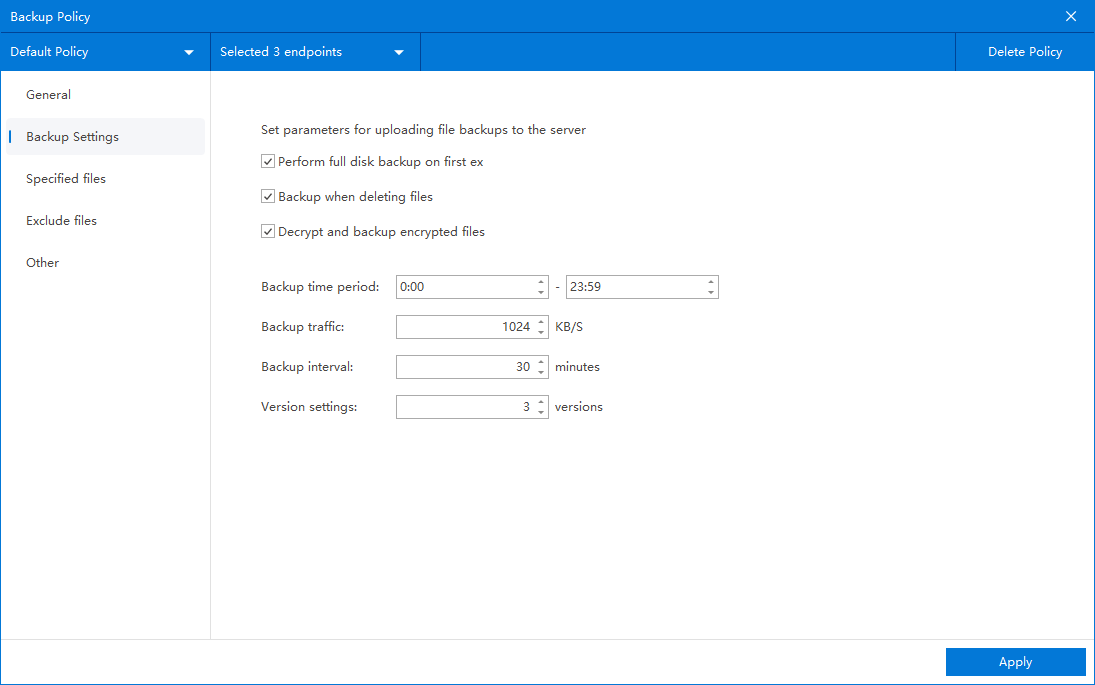
Backup Settingsand check
Perform full disk backup for the first time. This option is used to create a more complete base backup of the endpoint files when the policy is first executed.
4. Click
Specify File:
- If you want the employee endpoint to continue to back up related files during subsequent file operations, click Add to create a rule.
- File path is set to No limit on file path.
- File size is set to No limit on file size
- Check the file types that need to be backed up
- Click OK to save the rule
5. After the policy setting is completed, confirm that the endpoint for applying the policy is correct and click
Applyto deliver the full backup policy.
A full disk backup is more suitable for establishing an initial backup baseline. For environments with a large number of endpoints and large files, it is recommended to give priority to trial runs on key endpoints or sample endpoints, and then decide whether to expand the scope after confirming the backup time, network usage, and storage growth.
Back up employee deleted files
If the enterprise is more concerned about accidental deletion recovery, malicious deletion tracing, or deletion behavior forensics, it can further enable
Backup when files are deletedin the same policy. This capability will retain the corresponding backup copy when a deletion occurs on the endpoint to facilitate subsequent verification by the administrator.
1. Click
Backup Settingsin the policy settings interface of
File Backup.
2. Check
Back up when files are deleted.
3. After confirming that the policy application endpoint is correct, click
Applyto deliver the endpoint "Delete File Backup" policy.
After the policy takes effect, it is recommended to delete a test file on the test endpoint, and then go back to
Data Security→
File Backupto check whether the corresponding backup record has been generated. Administrators can also cooperate with the
Backup Reasoncondition to further confirm whether the deleted files are correctly marked and retained.
Implementation Suggestions
- Perform full disk backup for the first time is more suitable for establishing an initial backup baseline. It is recommended to combine the specified file rules for continuous optimization in the future.
- Backup when files are deleted is more suitable for recovering accidentally deleted files, tracking abnormal deletion behavior and retaining evidence collection evidence.
- If an enterprise only cares about office documents, design files or code data, it is recommended to appropriately converge on file types to avoid excessive storage costs caused by undifferentiated backups.
- For key positions, it is recommended to combine deleted file backup with File Operation audit to facilitate the restoration of the complete track before and after deletion.
- Before officially distributing it on a large scale, it is recommended to verify the backup time, resource usage and subsequent query results on a sample endpoint.
Updated


