In everyday workplace environments, employees installing software is entirely normal. However, when such behavior lacks control and falls outside of management oversight, it can quietly introduce significant risks to the organization.
Many issues do not stem from malicious intent, but rather from convenience-driven actions: downloading a more efficient tool, installing temporary software, or trying out a newly released AI assistant. Individually, these actions may seem harmless. But when they occur across a large number of endpoints, organizations gradually lose control over their software environment. What begins as individual behavior can evolve into an organizational issue—a slow yet irreversible process. Without centralized management, software sources, licensing status, version consistency, and data access paths become unclear, ultimately affecting security, compliance, and operational stability.
From “Convenience” to “Loss of Control”
In the early stages, most organizations do not recognize software installation as a management issue. Employees independently download tools to improve efficiency, often bypassing established IT processes.
Over time, problems begin to surface:
- A growing number of software applications installed across endpoints, from diverse sources
- Version fragmentation, making unified maintenance difficult
- Unclear licensing status, including potential unauthorized usage
- Background-running applications with unknown behaviors
More importantly, once software enters the endpoint environment, it can participate in data processing, file transfers, and system interactions. Without sufficient visibility and control, organizations struggle to determine whether risks have already occurred—or how they may be spreading.
Traditional Office Software Remains a Key Compliance Risk Area
In practice, the most concentrated risks often come not from complex systems, but from common office software. Tools such as word processors, spreadsheet applications, PDF editors, compression utilities, remote meeting software, and design tools are used across nearly all roles.
These applications are frequently used and widely available, making it easy for employees to download different versions from the internet—some of which may be unauthorized or from untrusted sources. This leads to several common issues:
- Unclear licensing status, including piracy or overuse
- Fragmented versions, making upgrades and maintenance difficult
- Complex and unverified installation sources, increasing security risks
- Lack of a software inventory, making audits and compliance checks difficult
While these issues may go unnoticed in daily operations, they can quickly escalate during external audits, customer compliance reviews, or legal investigations.
New Challenges Introduced by AI Agent Tools
Compared to traditional software, the emergence of AI Agent tools has significantly increased the complexity of software management.
These tools often possess strong interaction and data-processing capabilities. They are no longer just “tools,” but “execution units” that can actively participate in workflows. They may be deployed via browser extensions, desktop clients, or cloud-based services—easy to adopt, but difficult to fully understand in terms of capability boundaries.
In real-world usage, employees may input documents, data, code, or even sensitive internal information into these tools for content generation or decision support. Meanwhile, some AI tools can call external services and automate tasks, making data flows more complex.
For enterprises, the challenge is not whether to allow these tools, but whether they can clearly answer key questions:
- Where does the tool come from, and has it been evaluated?
- Does it involve data upload or external processing?
- What systems or files can it access?
- Does it provide logging and audit capabilities?
- Is its usage controllable and traceable?
If these questions cannot be answered, software management evolves from a compliance issue into a broader data security and governance challenge.
Practical Value of Ping32 Software Compliance Management
In endpoint management scenarios, uncontrolled software is often the root cause of security risks, compliance issues, and rising operational costs. Ping32’s software management solution establishes a complete governance framework centered around visibility, control, approval, traceability, and integration.
First, Ping32 enables centralized inventory of installed software across endpoints, helping administrators quickly understand the organization’s software asset landscape. High-risk, unauthorized, or irrelevant software can then be identified and addressed accordingly.
Rapid Software Asset Inventory Across All Endpoints with Ping32
When implementing software management with Ping32, administrators can first retrieve software installation data from all endpoints and build a unified software asset view.
The system automatically identifies and consolidates different versions of the same software, avoiding duplication in asset records and facilitating efficient analysis, reporting, and querying.
After identification, Ping32 further classifies software assets and detects licensing attributes. This enables administrators to clearly understand software distribution, usage purposes, and licensing status—providing a solid foundation for asset management, license audits, and policy governance.
To address compliance concerns, Ping32 also offers pirated software detection, allowing administrators to identify unauthorized or risky applications and take corrective action in accordance with internal policies.
Enforcing Unified Software Installation Control
If organizations aim to shift software installation from an employee-driven activity to a standardized process of request, approval, and auditing, Ping32 provides built-in control mechanisms.
Management Side
Administrators can configure policies in the Ping32 console under the “System & Network” module. By enabling “Software Installation Control” and selecting approval-based settings, all installation requests are routed through an approval workflow.
Once enforced, endpoints can no longer install software freely. All installation actions require prior approval. Exceptions can be configured through allowlists to ensure that approved business applications are not affected.
Endpoint Side
Users can initiate a request by right-clicking the Ping32 client icon and selecting “Submit Request” → “Software Installation Request.” After entering request details and selecting the installation package, the system automatically extracts relevant software information.
To improve approval accuracy, it is recommended to retain only key identifiers such as digital signatures and file names. Once approved, installation is permitted within the authorized scope.
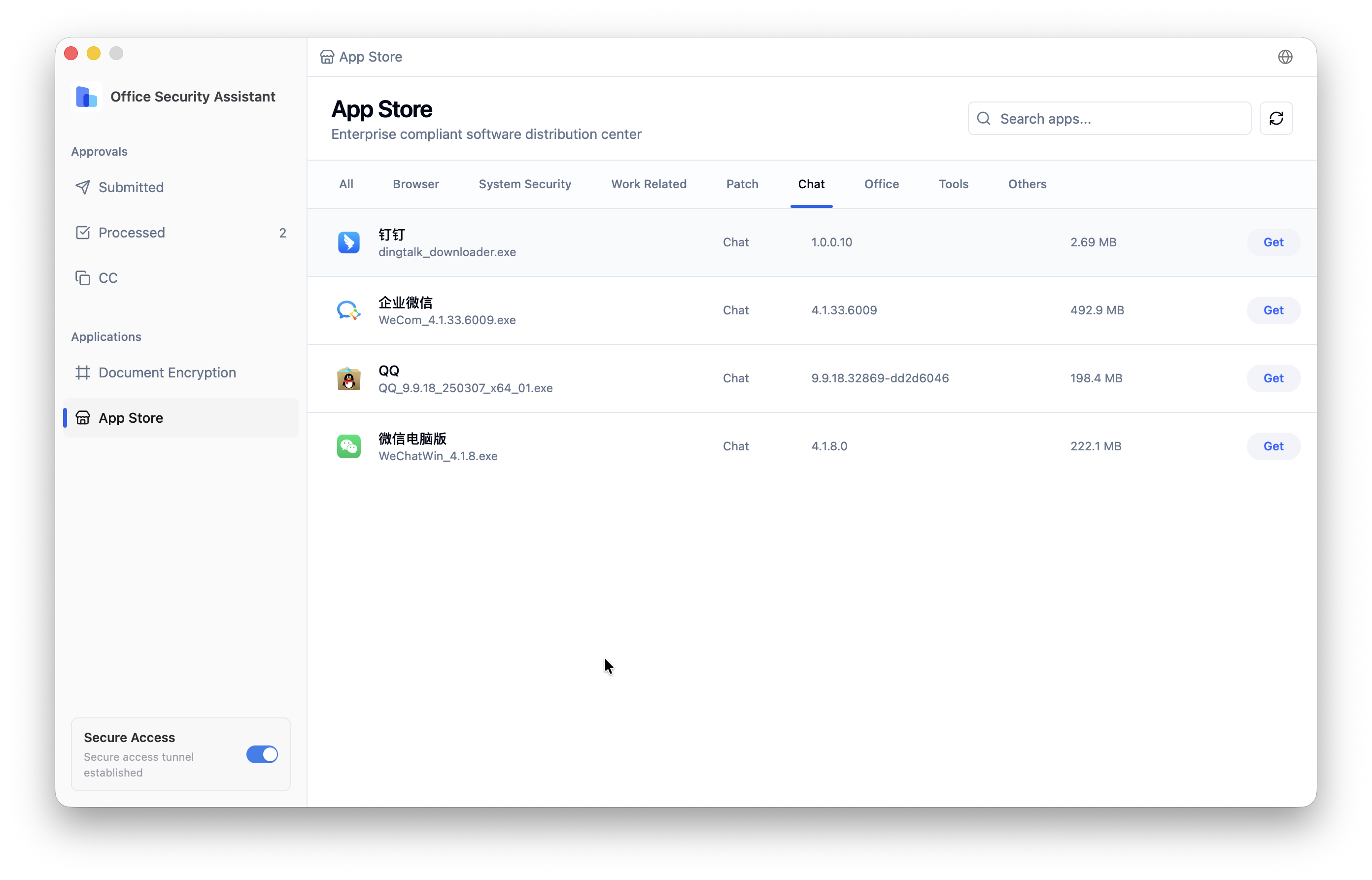
Organizations can also publish commonly used office software through a centralized software catalog, ensuring employees obtain tools through compliant channels. Meanwhile, all blocked or unauthorized installation attempts are logged for ongoing monitoring.
Through this approach, Ping32 transforms software installation from a fragmented, uncontrolled activity into a standardized, auditable, and manageable process.
The Real-World Significance of Software Compliance Management
The value of software compliance management may not always be immediately visible—but it becomes critical when risks arise.
First, it directly impacts legal and intellectual property risks. Improper licensing or unauthorized use can lead to financial penalties and reputational damage.
Second, it forms the foundation of endpoint security. Uncontrolled software sources can serve as entry points for malware.
Third, it enhances overall IT management capabilities. Only with clear visibility into endpoint software can organizations implement unified deployment, patch management, and security policies.
In the long run, software compliance also reflects an organization’s governance maturity. During customer audits, partnership evaluations, or regulatory inspections, a well-structured software management system is often a baseline requirement.
FAQ
1. Why should enterprises control employee software installation?
Because uncontrolled installation introduces licensing, security, and management risks, reducing endpoint visibility and control.
2. Is software compliance management only about preventing piracy?
No. It also includes software identification, license verification, version control, and installation management.
3. Should AI tools be included in software management?
Yes. AI tools may involve data access, external transmission, and compliance risks.
4. What problems can Ping32 solve?
It helps enterprises identify software assets, classify applications, detect pirated software, and improve overall software management efficiency.





 Contact


 8 min
8 min 


