

In corporate Internet behavior management, web access a […]
In corporate Internet behavior management, web access auditing is usually the most basic and first enabled capability. By turning on the audit content of website browsing in the Internet Behavior module through Ping32, administrators can continue to retain records of employee web page access behavior for daily behavioral traces, violation traceback, incident review, and compliance spot checks.
This type of strategy is particularly suitable for the following scenarios: first, it is necessary to confirm whether employees have visited non-work-related websites; second, it is necessary to investigate web page access behavior within a certain period of time afterwards; third, it is hoped to lay a solid foundation for subsequent website access control, sensitive word interception, outbound forensics and other policy construction. Compared with only conducting temporary inspections after problems arise, starting an audit first is more conducive to forming a continuous and traceable management closed loop.
Applicable scenarios and confirmation before implementation
Before officially launching, it is recommended to confirm two points:
- Whether the audit object is clear. If you only want to audit specific departments, specific positions or pilot endpoints, it is recommended to plan the policy application endpoint first to avoid issuing it to the entire network at the beginning, which will increase the cost of investigation.
- Are management objectives clear? The core value of web access auditing lies in “leaving traces” and “tracing back.” If access restrictions, sensitive content identification, or outbound blocking are required in the future, other strategies can be gradually added on top of this without having to enable all control items at once.
In addition, it is recommended to give priority to verifying the policy effect on test endpoints or small-scale endpoints. After confirming that record generation is normal, then gradually expand the application scope, which is more conducive to controlling change risks.
Policy configuration
1. Click Internet Behavior in the Ping32 Management Console, and then click Policy to enter the Internet Behavior Policy Settings interface.
2. In the Internet behavior policy setting interface, click Browse website to turn on Audit content.After Audit Content is turned on, Ping32 will record subsequent web page visits. It is recommended that administrators keep web page auditing enabled as a basic policy. Even if they do not intercept it for the time being, they should first settle the access traces to facilitate subsequent review based on time, personnel or endpoint dimensions.
3. After the policy setting is completed, confirm the policy application endpoint.
The focus of this step is not “whether to click apply”, but “who to apply to”. If the audit scope is limited to certain departments or endpoints, be sure to confirm whether the object is accurate before issuing it; if the wrong object is selected, the subsequent audit records will be incomplete, which may even affect the administrator’s judgment of the true access scope.
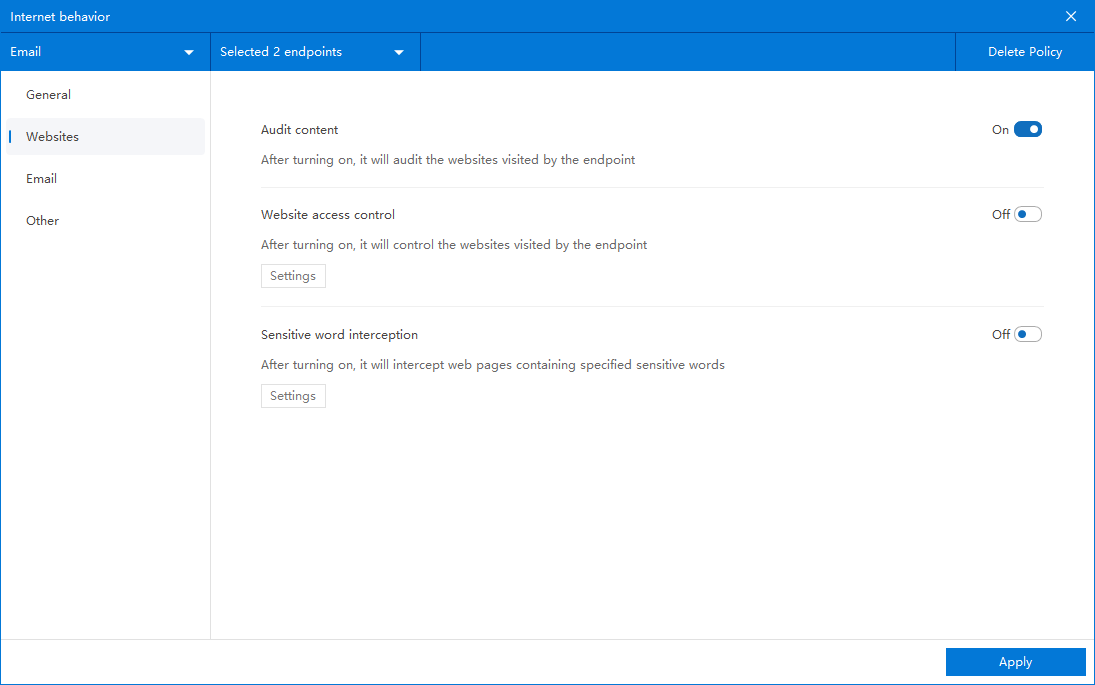
After confirming the policy application endpoint, click Apply to start monitoring and auditing employee web access records.
Audit record viewing and effect verification
After the policy is issued, click Online Behavior → Browse Website to view relevant audit records of employee web page visits.
In order to confirm that the policy has actually taken effect, it is recommended to conduct a verification as follows:
- Select a test endpoint that has been included in the policy application scope.
- Let the endpoint access several common websites, covering different categories of page access behaviors.
- Return to Internet Behavior → Website Browsing in the Ping32 Management Console to check whether the corresponding record appears.
- If further verification is needed, the access time, access endpoint, access personnel and other clues can be used for comparison to confirm that the record is consistent with the test behavior.
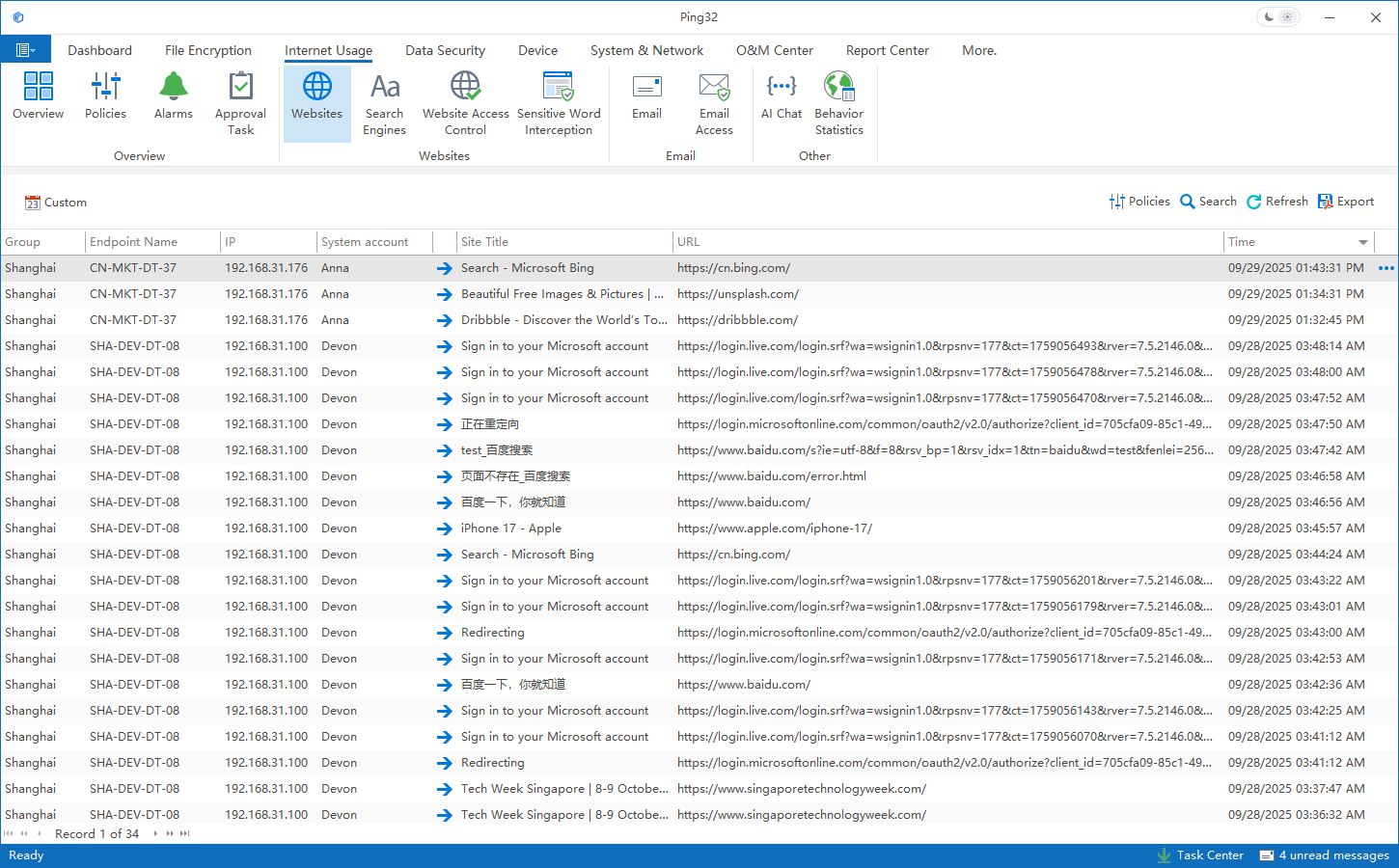
If the test endpoint has accessed the website, but there is no record in the interface, check three aspects first: first, whether the endpoint has received the policy; second, whether the endpoint is currently online; third, whether this visit occurred after the policy was issued and took effect. Usually, as long as there are no problems with these three links, the web page access records can be logged into the database normally.
Usage suggestions and common troubleshooting ideas
- If the enterprise does not have clear website control rules, it is recommended to start auditing and observe for a period of time, and then decide whether to enable website access control or sensitive word blocking based on actual access conditions.
- If the purpose of the audit is to cooperate with internal investigations or management reviews, it is recommended not to frequently adjust the application objects, otherwise the record ranges at different stages may be inconsistent, affecting horizontal comparisons.
- If you want to analyze employee behavior through web access records, you should make a comprehensive judgment based on job responsibilities, business periods, and access purposes to avoid misjudgment of normal business access as violations.
- If there are records in the console but the number is obviously too small, it is usually not caused by an “audit function failure” but caused by inconsistencies in the policy scope, endpoint online status, or verification time points. By checking these basic conditions first, you can usually locate the problem quickly.
From the perspective of implementation sequence, it is often more prudent to put audit first and control later. First, use Ping32 to continuously record web page access behavior, and then decide whether to add restrictions on specific websites, specific content, or specific positions. This can not only improve governance accuracy, but also reduce business interference caused by one-time forced control.

